
AVL
More control over sensors, reports, and integrations
Version AVL-2026-Q4-Release-1 · Minor release
Published:
AVL - 2026/Q4 - Release 1 adds configurable sensor reading bounds, configurable report intervals, and more flexible integration options. This release also fixes account hierarchy restoration and improves the reliability of monitoring, reports, and data displays.
New features
Configurable sensor reading bounds
For sensors with Result Type set to Value, you can define an optional Lower Bound, Upper Bound, or both, and choose whether to apply them before or after calibration. These bounds constrain the resulting value while preserving the original reading, rather than marking the reading as Out of Range.
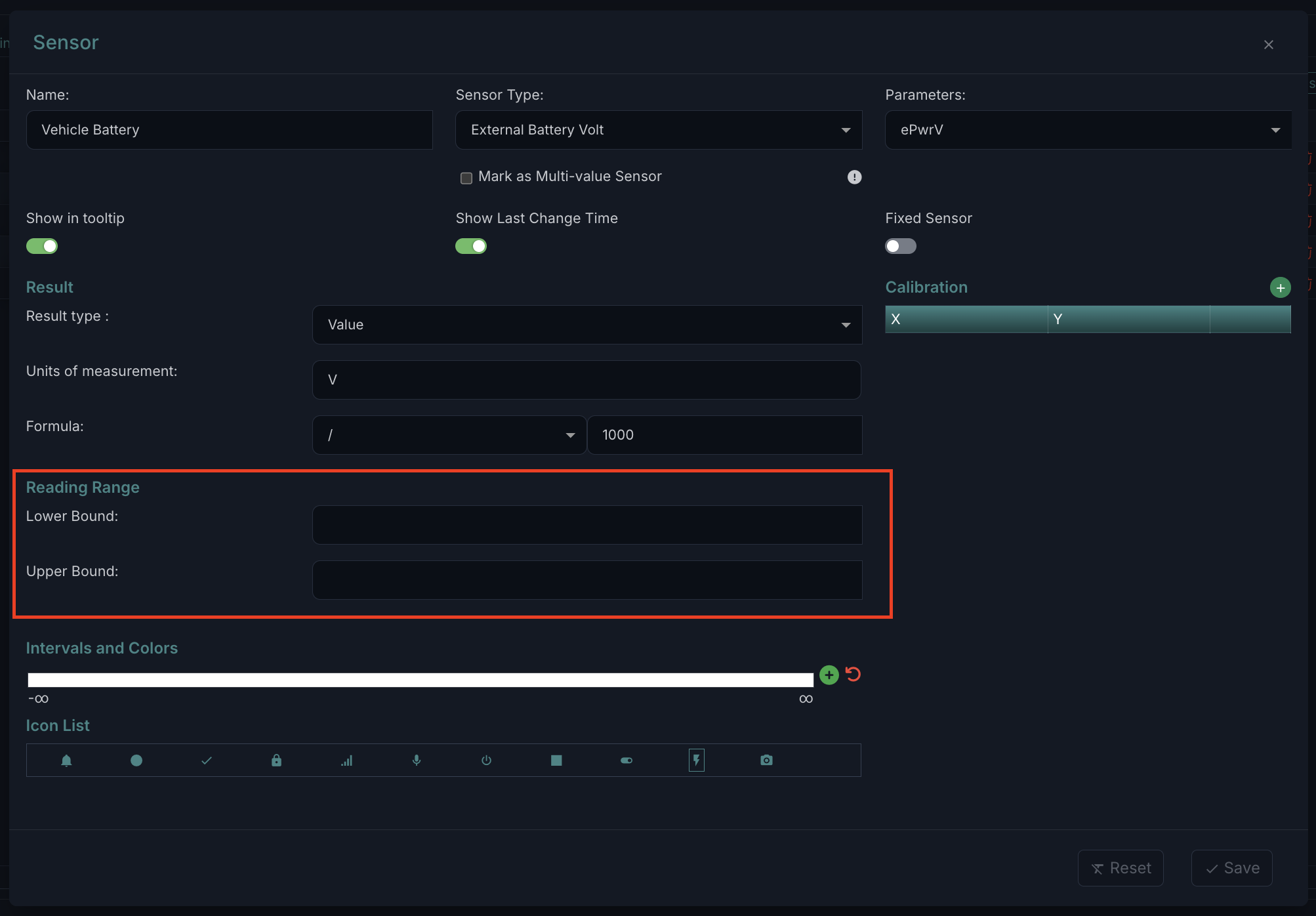
Customer impact: You can keep sensor values within a configured range while retaining the original readings for reference and processing.
Improvements
Configurable maximum report intervals
System administrators can now configure the maximum allowed date interval for each report instead of relying on a fixed limit. Report requests submitted through the API also respect the configured limit when Include Current is enabled.
Customer impact: You can tailor report intervals while keeping requests within the configured limits.
More selective unit data for integrations
The Units List API supports more options for selecting returned unit information through the projection parameter. Integrations can request only the information they need to reduce response size.
Customer impact: Your integration can retrieve more focused unit data.
Event descriptions in Notification Center
The Events tab in Notification Center now includes an Event Description column, giving you additional details directly in the event list.
Customer impact: You can review event descriptions without leaving the list.
HERE Maps for overspeed event detection
Overspeed by Google event detection now uses HERE Maps instead of Google Maps.
Integration documentation within Account & Settings
You can now access AVL API Integration Documentation from Account & Settings, including the latest API documentation and Postman collection.
Customer impact: Integration resources are easier to find from within AVL.
Chassis number in the unit profile
The unit Profile tab now includes Chassis Number.
Customer impact: You can find the chassis number alongside unit profile information.
Case-insensitive RFID and iButton validation
RFID and iButton validation now treats uppercase and lowercase letters the same.
Customer impact: Letter case no longer affects validation of RFID and iButton values.
Bug fixes
Preserved account hierarchy when restoring from Trash
Moving an intermediate account to Trash no longer reassigns its child accounts to the root account. Restoring the account preserves the original parent-child hierarchy.
Customer impact: Account relationships remain intact when you move an account to Trash and restore it.
Accurate chart filtering and color matching
Selecting a section of the Active units chart on the Statistics dashboard now displays only the data for that section. Chart section colors also match their corresponding cards.
Customer impact: You can interpret chart selections and related cards consistently.
Correct audit and login timestamps
Audit record details now display the correct creation timestamp without an incorrect time offset. Last Login Date also displays the correct user login time.
Customer impact: You can review audit creation times and user login times accurately.
Complete scheduled report visibility
All scheduled reports are now visible in Scheduled Jobs at 100% browser zoom without requiring you to zoom out. The scheduled report view also displays all email addresses in the E-Mails field without cutting them off.
Customer impact: You can review the full scheduled report list and recipient addresses.
Select all units with Ctrl + A
Pressing Ctrl + A while focused on the Units list in Unit Groups now selects all available units.
Customer impact: You can select units together for bulk actions using the keyboard.
Stable scrolling at the end of unit lists
Unit lists in Units and Monitoring now stay at the bottom when you finish scrolling, instead of jumping upward and hiding the final records.
Customer impact: You can view the last units in the list without repeatedly scrolling down.
Consistent map, video, and form displays
The Monitoring map remains visible when Edit Unit first opens, and Video History displays the selected map/video layout correctly, including after hiding and showing data. From/To fields in Tracking, Messages, and Second By Second display complete dates and times. Additional fixes address settings-page layouts, Units action tooltip casing, the Business Type label, and Skip SIM Information checkbox alignment.
Customer impact: You can use map and video layouts more reliably and read form details without truncation.
Clearer table layouts and column spacing
Table text no longer overlaps adjacent columns when columns are rearranged or expanded. The Units table aligns neatly below its tabs without excess whitespace or a stray line, and selection checkboxes are centered in Trashed lists.
Customer impact: Tables remain easier to read and select from as you adjust their layout.
No unintended sideways scrolling in Monitoring
Pressing the Left or Right Arrow key on the Monitoring page no longer shifts the entire page horizontally or displays an unwanted white vertical line.
Customer impact: The page layout stays stable when you use the arrow keys.
Correct unit tooltip position on first hover
Unit tooltips in Monitoring now appear beside the unit on the first hover after the page loads.
Customer impact: You no longer need to hover again to see the tooltip in the correct position.
Unobstructed Login As menu
Map controls no longer overlap the Login As dropdown menu in the user profile header.
Customer impact: You can view and select menu options without map controls covering them.
Stable table headers when adding custom fields
Selecting Date in the Add New Custom Field dialog no longer changes the table headers behind the dialog.
Customer impact: The Custom Fields table keeps its existing headers while you configure a new field.
Cleaner service editing dialogs
Removed the unnecessary vertical scrollbar from the Services area of the Monitoring Edit dialog and its service configuration dialog. Validation messages now appear beside their fields instead of behind them or beyond their borders.
Customer impact: Service settings and validation messages are easier to read.